SoftPerfect Virtual Disk Trim
Shrink virtual machine disk images on Windows, macOS and Linux without starting the VM
 SoftPerfect Virtual Disk Trim is a dedicated tool for making virtual machine disk images smaller.
Virtual disks grow as the guest system writes to them, but they do not shrink when files are deleted inside the guest: the space is free as far as the guest is concerned, yet it still takes room on the host. Over time those images can occupy far more space than the data they hold.
Virtual Disk Trim gets that space back in the most direct way. It opens the image file, reads the guest file system’s own record of which blocks are in use, and rebuilds the image omitting the blocks that hold nothing. It doesn’t require starting the virtual machine, mounting the image, or changing anything inside the guest. To ensure stability, it compares every trimmed image with the original before replacing it.
Virtual Disk Trim works for all common hypervisors and guest systems, on whichever computer the image is stored: a Hyper-V disk can be trimmed on a Mac, and a QEMU disk on Windows, with no virtualisation software installed.
Key features
- Every common image format: VHDX, VHD, VMDK (in one file or split into pieces), VDI, qcow2 and raw.
- Windows, Linux and Mac guests: NTFS, ReFS, FAT, exFAT, ext2/3/4, XFS, btrfs, APFS, HFS+, LVM volumes including thin pools, and Linux swap.
- No virtual machine required: the guest is not started and needs no tools, password or preparation, so appliance images, templates and archived VMs can be trimmed as easily as the ones you use daily.
- No zeroing of free space, so the image does not swell before it shrinks.
- Trimming in place: no room needed for a copy, only a little free space.
- BitLocker volumes are trimmed with their password or recovery key, and stay encrypted.
- Optional removal of page, swap and hibernation files, which the guest recreates by itself. A hibernation file is only dropped when the guest is not hibernated.
- Reduction of fixed-size disks: a fixed or preallocated disk is rebuilt as a dynamically expanding one that takes only as much as it holds.
- Whole disk in one pass: every partition and volume of an image is handled together.
- Whole folders at once: add a folder and every image in it is found, analysed and trimmed in turn.
- Disk keeps its identity, so the virtual machine finds it as before and nothing needs to be re-attached.
- Format conversion during trimming: copies can be written in any of the six image formats, so moving a disk to another hypervisor is one step.
- Graphical and command line interfaces: a multilingual GUI for easy use, and a command line tool with batch mode and a JSON report for scripts.
Know the space gain before deciding to trim
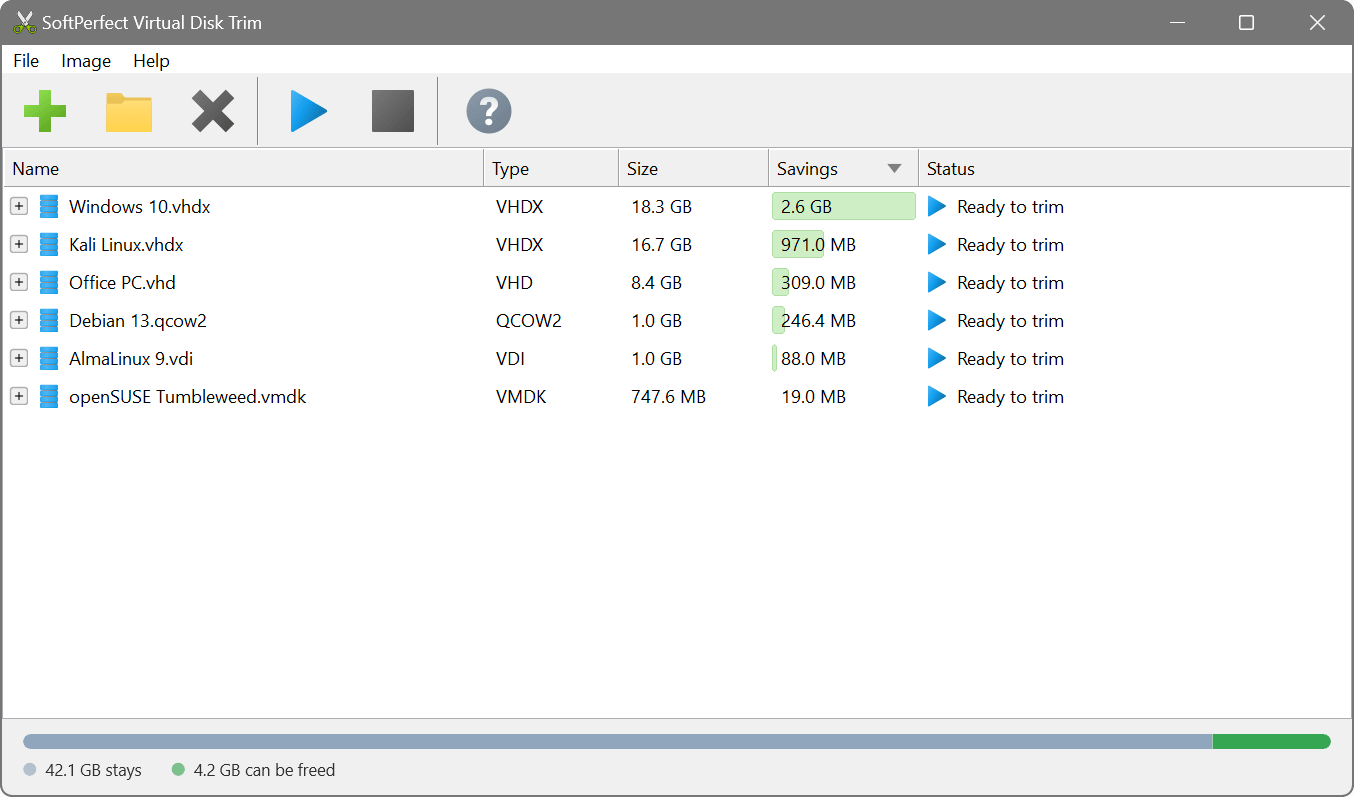
Add an image or a folder of images and Virtual Disk Trim shows, for each image and each volume inside it, how much space a trim would give back. This analysis is free and unlimited, makes no changes, and takes only moments. How much can be reclaimed depends on how much has been deleted inside the guest since the image grew: a freshly installed system usually has little wasted space, while a machine used for months can have a lot more.
How it compares with the usual methods
There are established ways to shrink a virtual disk and they do work. What sets Virtual Disk Trim apart is how little it requires and how much it offers.
| Method | Drawback | Virtual Disk Trim solution |
|---|---|---|
| Zeroing free space inside the guest with SDelete or zerofree, then compacting on the host | The VM must be started and a tool run inside it. The image first grows to full size. Slow on large disks, and wears SSDs. | The VM stays off and its disk is not written. Free space is read from the file system’s records: no zeroing, no second step. |
| Optimize-VHD in Hyper-V | Needs a Windows host with the Hyper-V role. Only VHD and VHDX with NTFS. | No hypervisor needed. Runs on Windows, macOS and Linux. More formats and file systems. |
| Compact tools in VMware and VirtualBox, and qemu-img convert | Deleted files keep their space unless it is zeroed inside the guest first. Each handles only its own formats. | Finds free space whether zeroed or not. One tool for most formats and hypervisors. |
Step-by-step guides: Hyper-V VHD and VHDX, VMware VMDK, VirtualBox VDI, QEMU and Proxmox qcow2, converting between formats.
How it keeps your data safe
- Original image stays until the trim result is verified. The trimmed image is written beside the original, read back and compared with it, and only then put in its place. Alternatively, trimmed copies are saved to a folder of your choice and the originals are left alone.
- Trimming in place is a transaction. A journal beside the image records each step. Blocks in use are copied only into unused space and verified, then the new layout is committed in one step. Interrupted before the commit, the image is unchanged. After it, the trim is finished from the journal.
- Stopped or failed trim changes nothing. The trim does not begin unless there is enough room for the result, or for the journal of a trim in place, and an interruption at any moment leaves a usable disk.
- Declines it cannot be certain and states the reason: a guest that was not shut down cleanly, a disk with snapshots, an encrypted image, a disk opened by another program.
- Copies as is what it cannot recognise. A volume with a file system it cannot read is carried over untouched while the rest of the disk is trimmed.
What it does not do
- Virtual Disk Trim does not shrink partitions or reduce the capacity the guest sees. That is a different task, which changes the layout of the disk inside the guest. A trim leaves the layout exactly as it was and only makes the image file smaller.
- Snapshot and differencing disks are not trimmed. The base disk under them cannot be distinguished from an ordinary disk. Merge or delete snapshots first; do not trim while they exist.
- Compressed qcow2 and stream-optimised or flat VMDK images are not supported yet.
- A volume it cannot read, such as a ZFS one or an encrypted one without its key, is copied as is and gives no space back. The rest of the disk is still trimmed.
- Fixed-size disks are not trimmed in place. A copy makes them dynamic instead.
Command line
The package includes vdtrim — a command line tool with the same engine. It analyses and trims single images or whole folders, writes a JSON report and returns exit codes a script can act on. It can also write the trimmed image in another format, turning a VMDK into a VHDX in the same pass, and zero the remaining free space of the file systems it reads, which clears most traces of deleted files from an image you hand to someone else.
Screenshots


Latest version
26.11 (7 November 2026)
Changelog
Supported platforms
Intel, AMD and ARM64
Licence
Try before you buy:
free unlimited duration trial showing how much space you could save
Download
🌐 Multilingual packages
Size: 7.1M
Size: 6.5M
Size: 10M