How to shrink a qcow2 image and reclaim space
A qcow2 image, as QEMU, KVM and Proxmox use it, grows as the virtual machine writes to it and keeps its size when files are deleted in the guest. This guide covers the usual ways to reclaim that space and a simpler one with Virtual Disk Trim.
The built-in ways
qemu-img convert. Shut the VM down and copy the image; clusters that are all zeros are left out. Space freed by deleting files is recovered only if it was zeroed inside the guest first.
virt-sparsify. Part of libguestfs on Linux. It reads the guest file systems and releases their free space, with no zeroing.
Discard. With discard enabled on the virtual disk (the Discard box in Proxmox, discard=unmap in libvirt), fstrim in the guest hands space back while the VM runs. It has to be set up per disk and does nothing for images that were not.
When the image does not shrink
- The free space was not zeroed before qemu-img convert, so the deleted files were copied along.
- Discard is off, or the disk is on a controller that does not pass it on; fstrim then fails, or succeeds without freeing anything on the host.
- The image has internal snapshots, which keep the old blocks alive.
- The storage is not a file. On Proxmox with LVM-thin or ZFS there is no qcow2 to shrink; space is managed by the storage itself.
The simpler way: Virtual Disk Trim
Virtual Disk Trim reads the guest file system from the image file itself and rebuilds the image without the unused blocks. The VM stays off, nothing is zeroed, and it runs on Windows, macOS and Linux with no QEMU or libguestfs installed.
- Shut the virtual machine down.
- Add the qcow2, or the folder with all your images. The Savings column shows what each would give back; this part is free.
- Press Trim. The trimmed image is verified against the original before it replaces it.
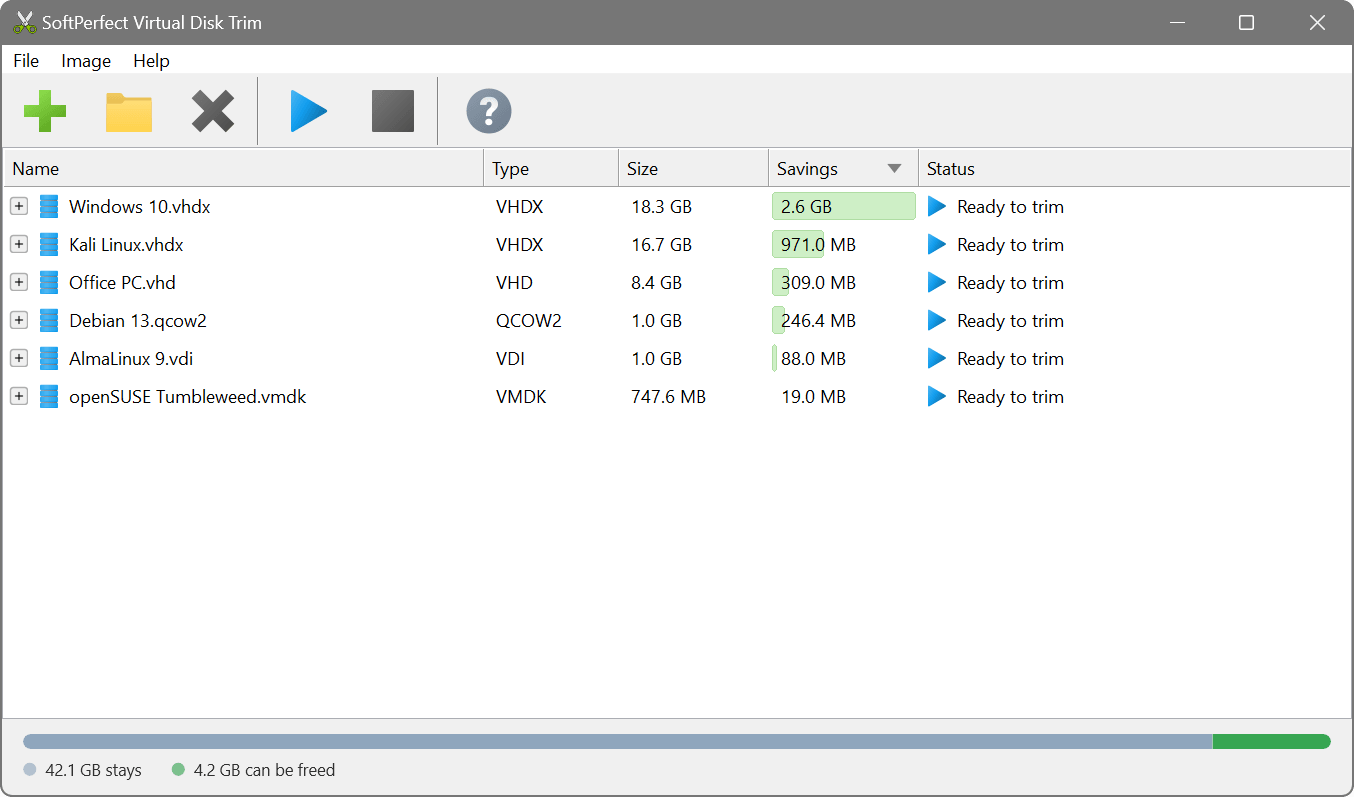
Or from the command line, also on a server without a desktop:
Which to use
If discard is set up and the guest runs fstrim, the image stays lean with no offline step, and nothing else is needed. On a Linux host, virt-sparsify does a similar job to Virtual Disk Trim. Virtual Disk Trim is the better tool when:
- the image is on Windows or macOS, where libguestfs is not available;
- the image was never set up for discard: a download, a template, an archive, a backup;
- you want every trimmed image compared with its original before the swap;
- you want page, swap and hibernation files left out as well;
- you have many images, or VHD/VHDX, VMDK and VDI files alongside the qcow2 ones.
Compressed images, as cloud images are usually published, have to be converted with qemu-img convert first. Images with snapshots or a backing file, and encrypted images, are not trimmed. An image that others use as their backing file is not recognised as one and must be left alone.
Moving to another hypervisor? The command line tool trims and converts in one pass; the name of the output decides the format:
Shrink, compact or compress?
With qcow2 this is usually called reclaiming space or sparsifying, and shrinking means the same thing: dropping the clusters the guest no longer uses. Compressing is different, and qcow2 really has it: qemu-img convert -c packs the data itself, which makes a smaller but slower image, the kind cloud images are published as. Reducing the capacity the guest sees is a third thing: the partition has to be shrunk inside the guest before qemu-img resize --shrink.