Device at 192.168.0.242 no longer detectable
2 posts
In the previous version, the device at 192.168.0.242 was detectable during scanning, but it is no longer found in the new version. The device has a statically assigned IP and is connected to a switch on the 192.168.1.0 subnet. Could you explain why this is happening?
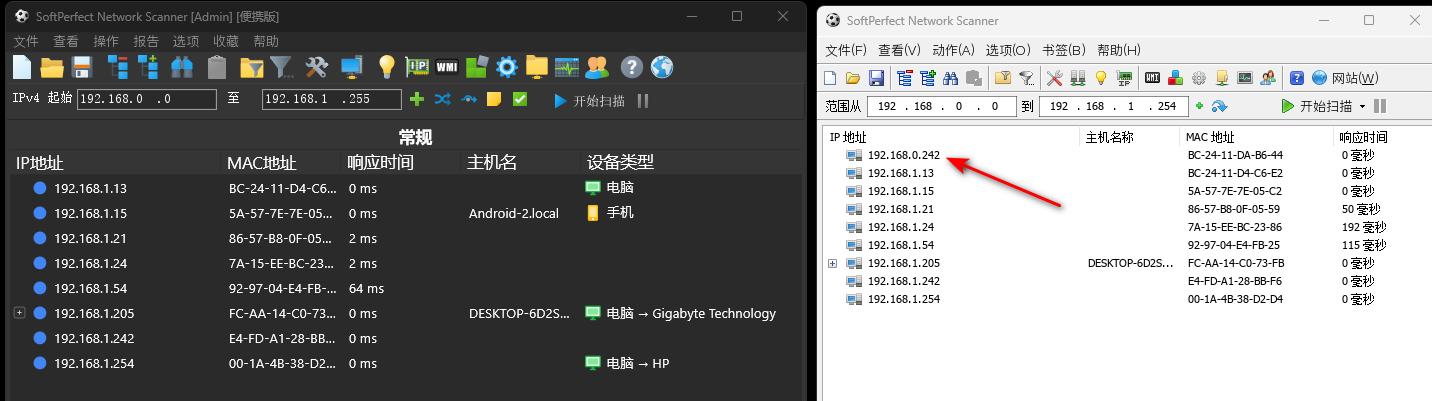
The device is answering ARP only. In your screenshot of the old version it shows 0 ms response time, which is what you get when ARP finds it but ping gets no reply, perhaps because of a firewall on the device. Its static address 192.168.0.242 is outside your PC's 192.168.1.x subnet, but being on the same switch it still answers ARP.
The current version, by default, only sends ARP to addresses inside your network adapter's subnet. To change that, tick Allow ARP outside current subnet (允许跨当前子网使用 ARP) in Options → Program Options → General (选项 → 程序选项 → 常规), and your 192.168.0.242 should show up again.