Global settings
There are several global settings that you may want to adjust before using the RAM Disk:
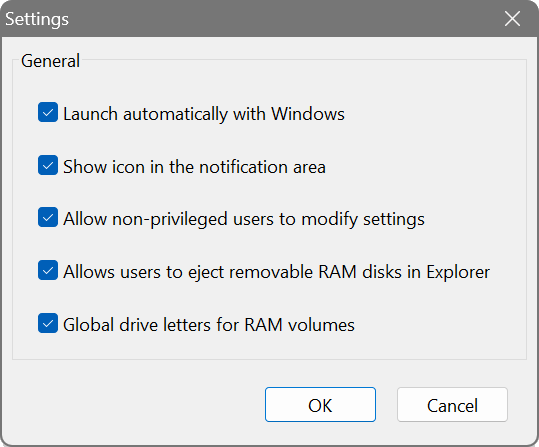
- Launch automatically at startup
- Launches the RAM Disk interface automatically when you log on. This displays the notification area icon and is needed for accessing application settings and mounting manually-created disks. Disks created at startup are mounted on boot by the driver regardless of this setting.
- Tray icon style
- Selects the style of the notification area icon. The available options are Colour, White and Black.
- Allow standard users to modify settings
- Allows users without administrative privileges to control the application and change its settings. When disabled, only administrators can make changes. This option is greyed out for non-admin users. In a corporate environment this may be turned off at the network administrator’s discretion.