Getting started
This guide introduces the main interface of IP Calculator and explains how to enter addresses and navigate between tabs.
The main window
When you first launch IP Calculator, you will see the Calculator tab with the IPv4 mode selected:
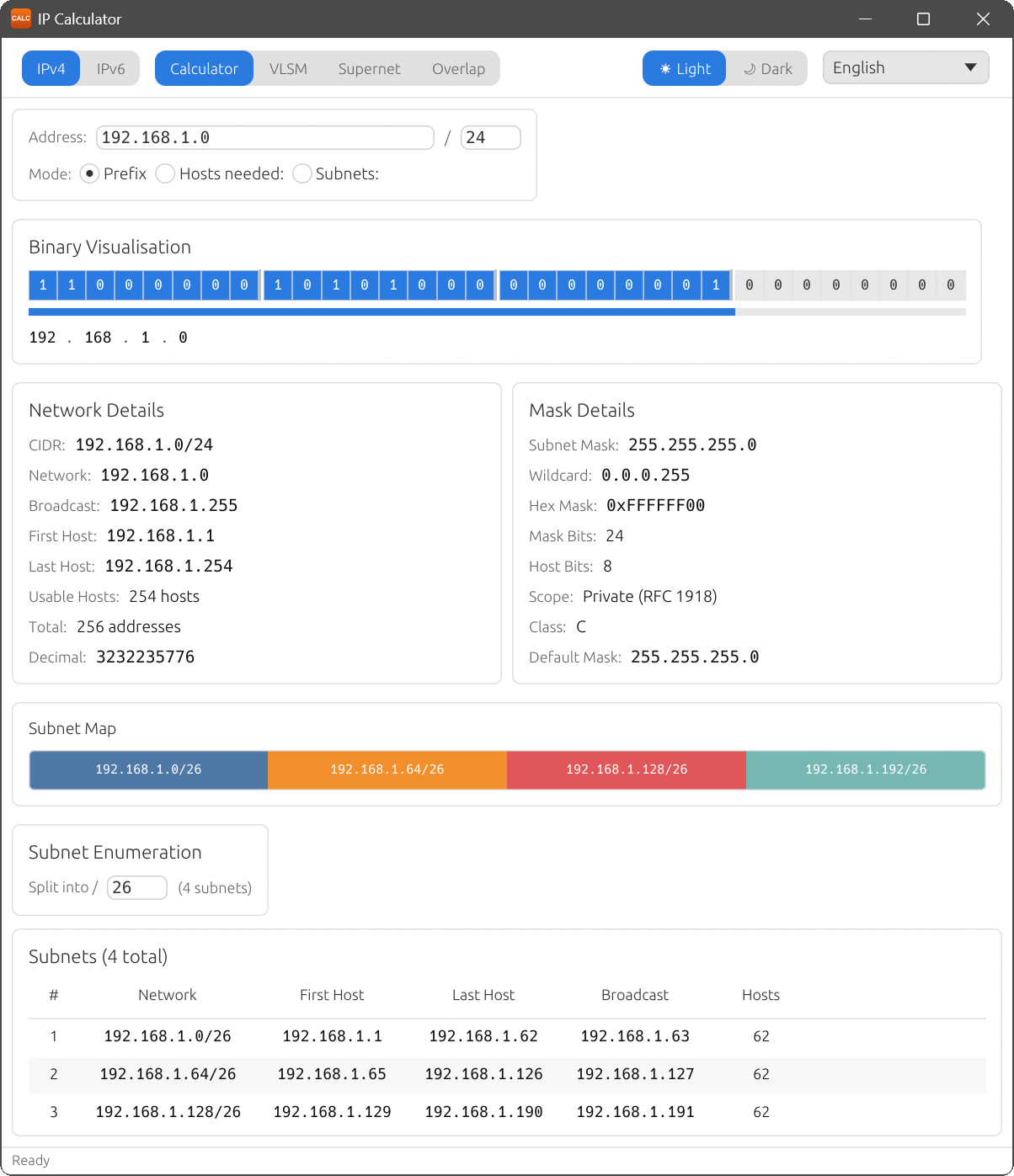
The main window consists of:
- IP version selector: switch between IPv4 and IPv6 at the top of the window.
- Tab bar: four tabs: Calculator, VLSM, Supernet, and Overlap.
- Address and prefix fields: enter an IP address and prefix length. Placeholder text shows the expected format.
- Details panels: show calculated network, mask, and address information.
- Binary Visualisation: displays all address bits with colour-coded network and host portions.
- Subnet section: lists enumerated subnets and displays the Subnet Map bar chart.
- Status bar: shows the current state, such as “Ready” or “Enter an IP address”.
Entering an address
Type an IP address in the address field and set the prefix length. For IPv4, the address field accepts dotted-decimal notation (e.g. 192.168.1.0) and the prefix accepts values from 0 to 32. For IPv6, enter a full or abbreviated address (e.g. 2001:db8::1) with a prefix from 0 to 128.
You can adjust the prefix length using the up and down arrow keys on the keyboard. The details panels, Binary Visualisation and subnet list update automatically as you change the address or prefix.
Input modes
In IPv4 mode, the Calculator tab offers three input modes, selectable from the radio buttons below the address field:
- Prefix
- Enter the prefix length directly (e.g. /24). This is the default mode.
- Hosts needed
- Enter the number of hosts you need, and IP Calculator will determine the smallest prefix that accommodates that many hosts.
- Subnets
- Enter the number of subnets you need, and IP Calculator will calculate the child prefix length required to divide the network into that many equal subnets.
Keyboard shortcuts
| Shortcut | Action |
|---|---|
| Ctrl+1 | Switch to Calculator tab |
| Ctrl+2 | Switch to VLSM tab |
| Ctrl+3 | Switch to Supernet tab |
| Ctrl+4 | Switch to IPv4 mode |
| Ctrl+5 | Switch to Overlap tab |
| Ctrl+6 | Switch to IPv6 mode |
| Ctrl+Z | Undo (Subnet Map split/join) |
| Ctrl+Y | Redo (Subnet Map split/join) |
| ↑ / ↓ | Increase / decrease prefix length |